

Here is how to fix the Office 365 Outlook account will pop up error message stating that to keep your account secure, you need to update your browser.
If you need help with Microsoft Office or Outlook LME Services is a top rated Managed Services Provider that can help
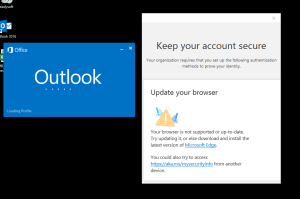
You do not need to update your browser to fix this error, it is much easier than that
All you have to do when this error occurs is to go OFFICE.COM and sign in with your Office 365 credentials (work email address and password).
You will then get a message asking you to set up MFA, validate your security settings, or add the Microsoft Authenticator to your phone.
If you do not know your Microsoft Office 365 credentials then simply do a password reset
What’s happening is that Outlook is trying to redirect you to an Office 365 verification page, but the redirect sometimes fails in Edge. All you have to do is log in to Office 365 via Chrome, Brave, or even Edge directly and finish whatever profile verification it asks for.
By logging into Office 365 you can fix the Keep Your Account Secure Outlook error
If you need a Managed IT Services to help you with Microsoft MFA issues give us a call
If you would like a cybersecurity consultant to make sure your Microsoft 365 security is properly set up, let us know.
Contact LME Services and We Will Fix This For You
Not sure your IT is actually being managed — or just limping along? LME Services provides managed IT, cybersecurity, and Microsoft 365 support for businesses across Chicagoland — proactively, so errors like this one get caught before your team ever sees them. Family-run since 1994.
This fix is part of our full Microsoft 365 & Outlook Troubleshooting Guide.
See the Full Guide