

How to Fix Google Gmail Error – Your Sign-in Settings Don’t Meet Your Organizations 2-Step Verification Policy
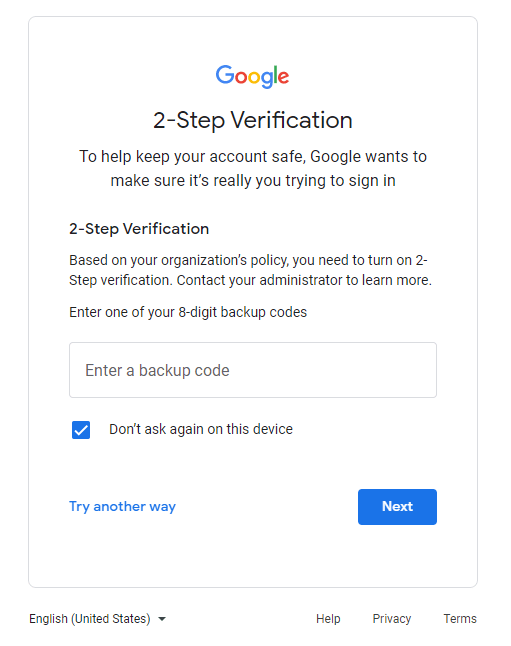
When 2FA is turned on in Google Workspace, you may run into an issue where Gmail users get an error message, per some help from reddit, this is how to fix the alert that Your sign-in settings don’t meet your organizations 2-Step Verification policy.
First off, you will not be able to log in without the assistance of your Google Workspace administrator.
If you need a top rated managed IT services company to help with your Google Workspace, give LME Services a call
Here is a step by step guide on how to fix the when your sign-in settings don’t meet your Google’s 2-step verification sign-in error
- Log into admin.google.com
- Click ‘Users’
- Find and select the User
- Select the ‘Security’ Tab
- Click ‘Login Challenge’
- Turn off Login challenges for 10 minutes
- Go to 2-Step Verification and copy a backup code. Provide the backup code to the employee
- Have the employee attempt login to gmail and when it prompts you for MFA or says to click TRY ANOTHER WAY to select the backup code option
- Enter the backup code
- Click on your initial in the upper right corner and select MANAGE YOUR GOOGLE ACCOUNT
- Select Security and then add a 2-Step Verification settings and remove any old phone numbers or email addresses
For more IT consulting services assistance related to google workspace email please click here.
Looking for a Cybersecurity Consulting Company to help secure your email security then check us out
Thanks for reading our guide on how to fix the Google 2-step verification sign-in error – Your Sign-in Settings Don’t Meet Your Organizations 2-Step Verification Policy
Contact LME Services and We Will Fix This For You
Not sure your IT is actually being managed — or just limping along? LME Services provides managed IT, cybersecurity, and Microsoft 365 support for businesses across Chicagoland — proactively, so errors like this one get caught before your team ever sees them. Family-run since 1994.
This fix is part of our full Microsoft 365 & Outlook Troubleshooting Guide.
See the Full Guide