

If you get a new phone and need to transfer over all your 2FA codes, you’ll need to set up a backup on your old phone using these steps. Keeping multi-factor authentication working smoothly across a whole team is exactly the kind of cybersecurity housekeeping our team handles for clients.
If you do not have a backup on your old phone because it was never setup and you can no longer access the phone then there is no way to recover the Microsoft authenticator codes.
Verify Backup Settings On Your Old iPhone:
- Go to Settings > Apple ID > iCloud > iCloud Backup > See ALL
- Check that Microsoft Authenticator is listed under Apps Using iCloud and toggled on
- Open Microsoft Authenticator app, go to SETTINGS and turn on iCloud backup
- Make sure to provide the email account you use in your iCloud backup from step 1
- If there is already a backup then you can skip to the next section
Recover Backup Settings To Your New iPhone:
- Download and Install Microsoft Authenticator on your new iPhone
- Open the App, if it asks you can skip the sign in option
- On the main screen you should see the option to BEGIN RECOVERY (if you don’t see this then uninstall and reinstall the Microsoft Authenticator app)
- Provide the email account from the steps you used to backup your settings
Verify Backup Settings On Your Android Phone:
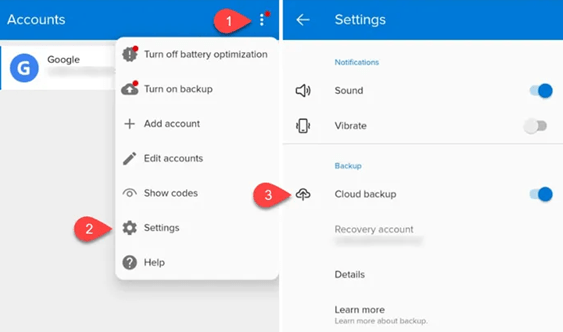
- Open the Microsoft Authenticator app click on the 3 dots and go to Settings
- Under BACKUP
- Turn on Cloud Backup and provide an email address
Recover Backup Settings To Your New Android Phone:
- Download and Install Microsoft Authenticator on your new Android Phone
- Open the App, if it asks you can skip the sign in option
- On the main screen you should see the option to BEGIN RECOVERY (if you don’t see this then uninstall and reinstall the Microsoft Authenticator app)
- Provide the email account from the steps you used to backup your settings
How To Transfer Microsoft Authenticator To A New Phone Without The Old Phone
Sorry, there is no way to recover your authenticator codes if you did not setup a backup on original Authenticator phone
In short: to transfer your authenticator app from your old iPhone or Android, you have to back up your codes to the cloud on your old phone before you recover them on your new one.
Setting up MFA and account recovery correctly across a whole company is exactly the kind of managed IT services we provide for Chicagoland businesses.
Contact LME Services and We Will Fix This For You
Related Cybersecurity Essentials
- How Hackers Crack WiFi Passwords (and How to Protect Your Network)
- The History of Cyber Security
- Stop Hackers from Remotely Accessing Your Computer via RDP
- How to Easily Find Diagnose if a File or Website Is a Virus
- What Are the Pros and Cons of Getting a Firewall
- What a Google User Sees When You Enable 2FA in Google Workspace
- How to Set up a Password Manager for Your Startup Business
- How to Set up a Password Manager for Your Law Firm
This fix is part of our full Microsoft 365 & Outlook Troubleshooting Guide.
See the Full Guide