

If you have an issue where the TO field on your phone is showing the wrong display name or email address then it is typically a Contact Card issue.
To fix when the wrong display name shows up on your phone, ppen up the Contacts App on your Android or iPhone and go to whichever contact is showing up in the TO field.
Edit that contact scroll all the way through and see what incorrect email address information may have been inputted into that contact that has messed up your phone’s ability to recognize the correct contact.
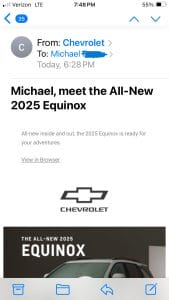
In our case, a C-Level was sending emails to himself but the display name showed the email was coming from another employee. We went into that employee’s contact card on his iPhone and saw that he had somehow entered his email address into the HOME Email field of this other employee’s contact card.
We removed the C-Level’s email address from the employee’s contact card on the C-Level’s phone and everything now displays properly.

Getting mail apps and directories configured correctly across a whole team is exactly the kind of Business IT support we provide for Chicagoland companies.
Contact LME Services and We Will Fix This For You
Related IT Services Guides
- How to Change Network From Public to Private
- How Managed IT Services Support Chicago’s Remote and Hybrid Workforces
- How to Fix Microphone Lag on Zoom
- Gmail Emails Are Hidden or Missing
- The History of IT Support Services
- How to Whitelist Domains in Google Workspace Admin Console
- The Benefits of Proactive IT Support
- How to Setup Scan to SMB Desktop on a Mac
- Dell OptiPlex Won’t Boot After SSD Clone of Windows 10